
Practice Management
Appointment Reminder Best Practices: Timing, Channels, and Wording That Cut No-Shows
Published October 6, 2026
The best appointment reminders do two jobs. They remind the patient, and they make it easy for the patient to tell you when they can’t make it. Most practices get the first part right and miss the second. Here’s how to get both right: when to send reminders, which channel to use, what to say, and the mistakes that keep no-show rates stuck.
Why More Reminders Alone Aren’t Fixing No-Shows
In an August 2026 MGMA Stat poll, 32% of medical groups said no-shows were higher than the year before. Many of those practices had already added more reminders.
That’s because patients don’t only miss appointments because they forget. Work conflicts, weather, emergencies, and costs get in the way. A reminder can’t stop any of those things from happening. What it can do is make it easy for the patient to tell you, early enough to give the time to someone else.
So a good reminder is only half the job. Making it easy for patients to reach you is just as important, so when something comes up, they can cancel or reschedule, even at the last minute, instead of just not showing up. (We covered the cost side of this in Reduce No-Shows: How Healthcare Practices Can Start 2026 Strong.)
When to Send Appointment Reminders
A single reminder isn’t enough. A simple schedule that works for most practices:
- When the appointment is booked: a confirmation with the date, time, and location, so the patient has it in writing from the start.
- 2–3 days before: the main reminder. It gives the patient time to rearrange their day, or to tell you they can’t make it while you can still fill the slot.
- About 24 hours before: a final reminder for anyone who hasn’t responded.
Adjust by appointment type. A new-patient visit with paperwork to complete may need an earlier first reminder than a quick follow-up.
Which Channel to Use
Text first. Patients often don’t answer unknown numbers or listen to voicemail, but they’ll read a text, and replying takes seconds.
Keep email and voice as backups. Some patients prefer email, and some don’t have a mobile phone. Let patients choose, and make sure your reminders follow their preference.
What to Say in an Appointment Reminder
Short and specific wins. Every reminder should include:
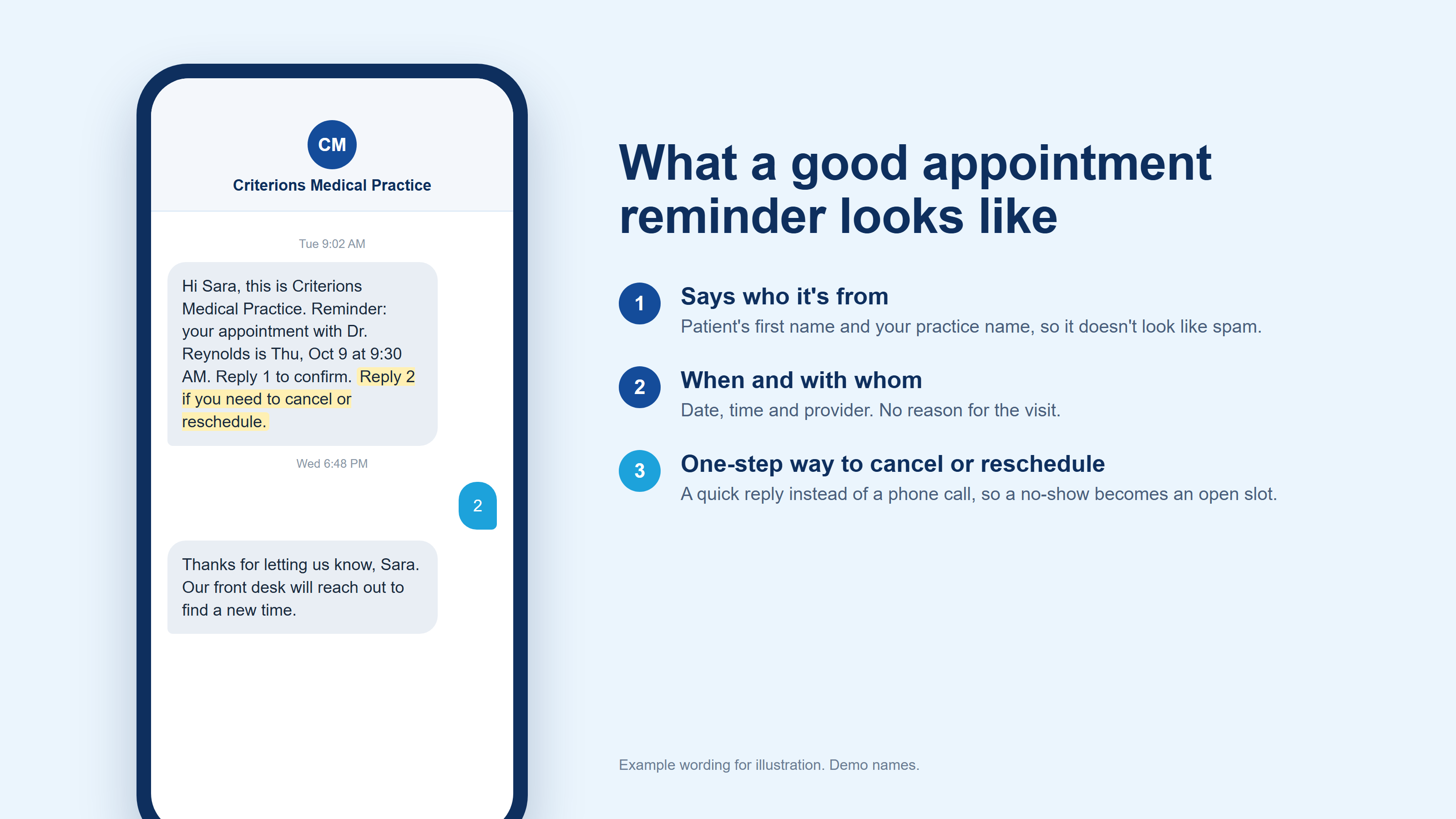
- The patient’s first name and your practice name, so it doesn’t look like spam
- The date, time, location, and provider
- One clear instruction for confirming, canceling, or rescheduling
Leave out the reason for the visit and any clinical details. A reminder should make sense to the patient and say nothing to anyone else who sees their phone.
Write it in your office’s voice. A reminder that sounds like your front desk gets a better response than one that sounds like a system.
Make It Easy to Cancel or Reschedule
This is the part most practices skip, and it’s the part that turns a would-be no-show into an open slot.
- Let patients reply instead of calling. “Reply 2 if you need to cancel or reschedule” gets an answer. “Call our office to reschedule” usually doesn’t, especially after hours.
- Say it in every reminder, including the last one. Plans change the night before.
- Thank patients who cancel. You want them to keep doing it.
- Act on cancellations right away. Keep a short list of patients who want an earlier appointment, and offer the open time as soon as it comes back.
A cancellation you know about is an appointment you can fill. A no-show isn’t.
Three Reminder Mistakes to Avoid
- Sending only one reminder. One message is easy to miss or forget. Two or three, spaced out, give the patient more than one chance to see it and respond.
- Giving patients no easy way to respond. If the only option is calling the office, many patients won’t, and the slot goes empty.
- Sending generic, robotic messages. If the reminder doesn’t clearly say who it’s from, patients ignore it or assume it’s spam.
Check Whether It’s Working
Track your no-show rate (missed appointments divided by scheduled appointments) every month, and look for patterns by day, provider, and appointment type. If no-shows aren’t moving, look at your reminder timing and at how easy it is for patients to cancel. More reminders usually isn’t the fix.
Frequently asked questions
How far in advance should you send an appointment reminder?+
Send a confirmation as soon as the appointment is booked, a reminder 2–3 days before the visit, and a final reminder about 24 hours before. The early reminder gives patients time to rearrange their day, or to tell you they can't make it while you can still fill the slot.
Are text reminders better than phone calls?+
For most patients, yes. Patients often don't answer unknown numbers or listen to voicemail, but they'll read and reply to a text. Keep email and voice available for patients who prefer them or don't have a mobile phone.
What should an appointment reminder say?+
Keep it short: the patient's first name, your practice name, the date, time, location, and provider, plus one clear instruction for how to confirm, cancel, or reschedule. Leave out the reason for the visit and any clinical details.
Should appointment reminders let patients cancel?+
Yes. A cancellation you know about is an appointment you can fill. A no-show isn't. Reminders that make it easy to cancel or reschedule, without calling the office, turn would-be no-shows into open slots your front desk can offer to someone else.
Related articles
Practice Management
How to Reduce Medical Billing Claim Denials
Most claim denials are preventable. Here's where they actually come from, and 7 concrete ways to catch the errors before a claim ever leaves your practice.
Published September 9, 2026
Practice Management
Reduce No-Shows: How Healthcare Practices Can Start 2026 Strong
Missed visits don't just disrupt schedules — they quietly drain revenue, frustrate staff, and limit patient access to care. Here's what actually reduces no-shows.
Updated October 6, 2026
EHR
AI Medical Documentation: What Practice Managers Need to Know
AI documentation tools listen during the visit and draft the clinical note automatically. Here's what that actually changes, and what practice managers should evaluate before adopting one.
Published September 23, 2026
See how reminders work against your own schedule
The best reminder setup is one your front desk doesn't have to think about: reminders go out on the schedule you set, in wording that sounds like your office, and patients can reply to confirm or ask to reschedule without picking up the phone.
We'll walk you through how it works in Criterions using your own appointment types.