
Feature
Medical scheduling software that shares a record with billing
Provider and resource scheduling on the same record as billing, intake, and reminders — so a schedule change never needs re-entering in a second system.
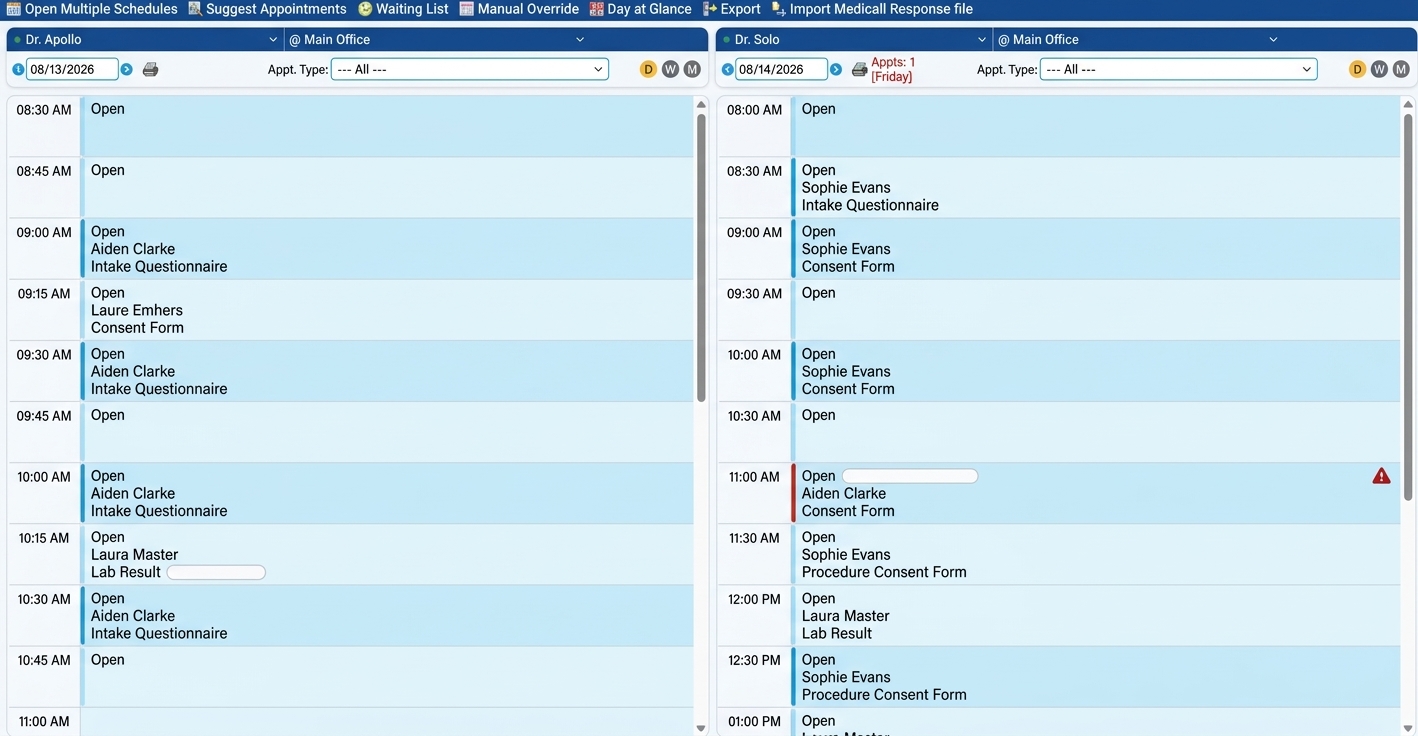
One record, not a synced copy
Billing, intake, and reminders read and write the same schedule, so nothing is ever confidently wrong between syncs.
Book by provider, room, or location
Handle the real rules — a shared procedure room, a provider who's only in Thursdays — without double-booking.
Fewer overbooked, backed-up days
Limit appointment types or daily volume per carrier, with staff alerts built in before the day gets away from you.
Most practices don't have a scheduling problem — they have a scheduling-and- everything-else problem. The calendar is one system, billing is another, reminders are a third, and the front desk is the integration layer holding them together by hand.
Criterions medical scheduling software isn't a calendar that syncs to your billing system. It is the same record: book the appointment and the charge, the reminder, the intake form, and the claim are all already attached to it.
Multi-Resource Booking
Scheduling by provider, resource, and location
Book against providers, rooms, equipment, and locations, with the rules each of those actually has — a provider who only does procedures on Thursdays, a room two providers share, a satellite office open three days a week.
The front desk sees one calendar rather than reconciling several, which matters most on the days it goes wrong: a provider calls out and someone has to move eleven appointments without double-booking a room or stranding a patient at the wrong location.
A visit gets rescheduled
Billing, intake, and reminders update on the same record
Nothing has to be told twice
One Shared Record
What "same record" actually changes
A calendar that syncs is a calendar that is periodically correct. Between syncs it is confidently wrong, and every downstream system inherits that — reminders go out for a visit that moved, an intake form arrives for the wrong provider, a charge posts against a slot that was cancelled Friday.
When scheduling, billing, intake, and reminders read and write the same record, there is no interval to be wrong in. A patient replies to cancel a reminder and the slot opens. The front desk moves an appointment and the intake form follows it. Nothing has to be told twice.

Connected Workflow
Everything that attaches to a scheduled appointment
Appointment reminders go out from the schedule and write replies back to it. Patient intake forms are sent against the booked visit. Eligibility can be checked ahead of it, and the claim comes off the same encounter afterward.
Each of those is a module you license only if you want it — but they all attach here, which is why the scheduler tends to be the part of the system a front desk lives in.
Move an appointment through Confirm, Check-in, Seen, Checkout, or Cancel — or move it to a new slot — without digging through menus to do it. You can also restrict specific appointment types, insurance carriers, or the number of appointments allowed per day, with staff alerts built in to keep a full day from turning into a waiting-room backlog.
Frequently asked questions
What is medical scheduling software?+
Medical scheduling software manages appointment booking for a practice — provider calendars, room and equipment resources, multiple locations, and the rules governing each. In an integrated system it also connects the appointment to what happens around it: patient intake, appointment reminders, eligibility checking, and the claim generated from the visit.
Can patients book their own appointments online?+
Patients can request or schedule appointments through the Criterions Patient Portal, which is included free with Criterions EHR. Requests land against the same schedule your front desk works from.
Do I need Criterions EHR to use scheduling?+
No. Scheduling is available with Criterions Practice Management and with Criterions EHR, so a billing company running claims and scheduling without a clinical chart, and a practice running the chart without the billing side, can both use it.
Can patients check in and confirm appointments by text?+
Yes. Patients can check in virtually from anywhere and confirm appointments with a text, cutting down on front-desk phone calls.
Does the Scheduler check insurance eligibility?+
Yes. Insurance eligibility can be verified before the appointment, so coverage issues surface before the patient is in the chair, not after.
Can staff post co-pays directly from the scheduler?+
Yes. Co-pays can be posted directly to the patient's ledger — by cash, check, or credit card — without leaving the scheduling workflow.
The schedule is where the day goes wrong first
A provider calls out at 7:40am. Somebody moves eleven appointments, then re-enters those changes in the reminder tool, checks nothing was double-booked into the shared procedure room, and spends the morning fielding calls from four patients who got a reminder for a visit that no longer exists. None of that is a scheduling failure. It's a failure of the schedule not being the same record as everything attached to it.
The specific fix is that it is one record. Move the appointment and the reminder, the intake form, and the charge follow it, because they were never separate copies.
Over 660 practices and billing companies run on Criterions. Bring a bad-morning scenario from your own practice to a demo — that's a more useful test than a feature list.