
Feature
Digital patient intake software, completed before the visit
Send intake, ID upload, and consent forms by text before the visit — patients complete them on their own phone instead of a waiting-room clipboard.
Forms sent by text or email before the visit
Patient completes them on their own phone
Front desk has it ready before the visit starts
No clipboard, no waiting-room delay
Patients complete intake, ID, and consent forms on their own phone before they leave the house.
Legible answers, not handwriting to decode
Patients type their own information on their phone before the visit, so staff aren't deciphering handwriting during check-in.
ID and insurance cards uploaded ahead of time
Patients photograph and upload their ID and insurance card before the visit instead of handing over a physical card to be copied at the front desk.
The waiting room clipboard is the same intake process practices have used for forty years, and it is still the reason patients arrive fifteen minutes early and staff spend the start of every visit typing someone else's handwriting into the system.
Criterions moves that step to the patient's phone before they leave the house, so what reaches your practice is a clean, typed form instead of a scanned PDF or someone else's handwriting.
Where Time Gets Lost
What patient intake means, and where practices lose time in it
Patient intake is everything a practice collects before a visit can be documented and billed: demographics, insurance details, medical and medication history, consents, and identification. It's the front door of both the chart and the claim.
Which is why it's an expensive place to be slow. Intake collected on paper gets entered twice — once by the patient, once by staff — and every re-entry is a chance for a transposed policy number, which surfaces later as a denial rather than as a typo. The cost of a clipboard isn't the paper. It's the claim that comes back three weeks later.
Digital-First Forms
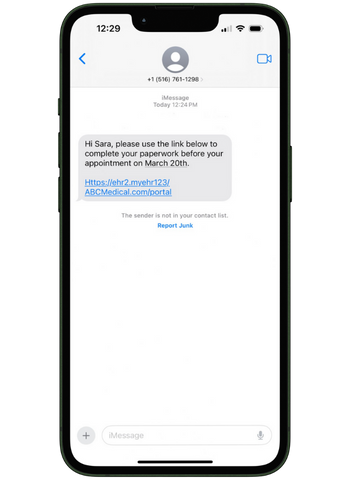
Forms by text, completed on a phone before the visit
Intake forms, ID and insurance card uploads, and consent documents go out by text or email ahead of the appointment. Patients complete them on the device already in their hand — no app, no portal account, no password reset call to your front desk.
What arrives on your side is a clean, typed form, not an image of one — faster and more accurate for your staff to work from than someone else's handwriting on a paper clipboard.
Front Desk Impact
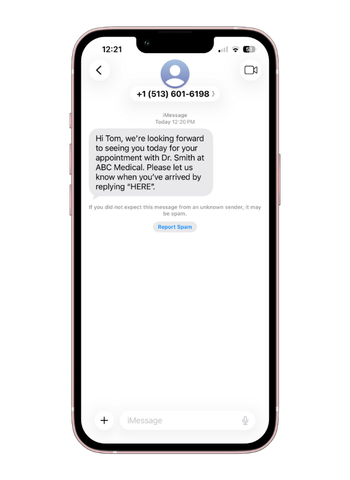
Electronic check-in that cuts front desk congestion
Once a patient arrives, check-in can happen from their own device or an in-office tablet rather than a sign-in sheet, capturing more accurate data and offering a more contactless experience for patients who prefer it. Payments collected during intake post automatically to the patient's ledger as well.
A cardiology intake and a podiatry intake are not the same conversation, and the forms shouldn't be. Intake forms are configurable to the questions your specialty actually needs answered, in the same way the chart is.
Frequently asked questions
What is patient intake in healthcare?+
Patient intake is the process of collecting everything a practice needs before a visit can be documented and billed — demographics, insurance information, medical and medication history, consent forms, and identification. It's the first step in both the clinical chart and the claim, which is why errors introduced at intake tend to surface later as documentation gaps or claim denials.
Do patients need an app or a portal login to complete intake?+
No. Forms are sent by text or email and completed in a browser on the patient's phone. There's no app to download and no account to create, which is what keeps completion rates up among patients who would otherwise arrive and ask for the clipboard.
Does the information go into the chart automatically?+
Not automatically — a staff member enters the completed form into the chart. What digital intake removes is the handwriting: patients type their own answers on their phone before the visit, so staff are working from a clean, legible form instead of a paper clipboard.
Can patients upload documents like ID or insurance cards?+
Yes. Patients can securely upload documents and IDs as part of pre-visit intake, rather than handing over a physical card to be copied at the front desk.
Can patients check in electronically once they arrive?+
Yes. Electronic check-in is available from a patient's personal device or an in-office tablet, reducing front desk congestion and offering a more contactless experience.
The clipboard costs more than the fifteen minutes
Every field a patient writes down and a staff member retypes is a field that can be transposed, and insurance numbers are the ones that come back — as a denial, three weeks later, when tracking down the correct information means calling a patient about a visit they've forgotten. Multiply that across a year and it is not a small number.
The fix is specific: forms go out by text before the visit, and patients complete them on their own phone instead of a waiting-room clipboard — so what your staff works from is a typed form, not someone else's handwriting. There's no app for anyone to install.
Over 660 practices and billing companies run on Criterions. Bring your current intake process to a demo and it's usually obvious within ten minutes where the re-entry is happening.