
1. Overview
Purpose:
This report shows the aging of the outstanding A/R for the Practice
Target Audience:
Billers, clinical staff, admin
2. Report Location
Navigation Path in System:
Reports >> Billing Reports >> Practice Reports >> Aging
3. Report Filters & Parameters
| Filter Name | Description |
| Show Patient services | Shows Patient services |
| Show Patient total only | Limits results to totals only |
| Split report by doctor | Report is split by doctor |
| Do not split report by doctor | Report is not split by doctor |
| Print for primary insurances only | Limits results to primary insurance only |
| Print for secondary insurances only | Limits results to secondary insurance only |
| Print for both primary and secondary insurances | Limits results to both primary and secondary insurances |
| Show services in specific date span only | Limits the results to a specific period. |
| Select Location(s) | Restricts results to one or more locations. |
| Split report by locations | Report is split by locations |
| Show Aging from Closing | Aging calculated from the last closing date |
| Show Patient Names and total only | Shows patient names and totals only |
| Split Report by procedure group | Report is split by Procedure group |
| Show in Descending order | Report shows in Descending order of the total amount |
| Physician name | List of physicians |
| Select Aging interval | Set the aging interval for the report |
| Start with aging period | Report starts with the selected aging period |
| Select Aging by Age from aging date | Aging calculated from Claim submission date |
| Select Aging by Age from service date | Aging calculated from date of service |
| Insurance Type | Select Insurance Type(s) |
| Insurance Carriers | Select Insurance Carrier(s) |
| Practice Option: Print report for current practice only | Report includes current practice only |
| Practice Option: Print report for multiple practices | Report includes multiple practices |
4. Output Columns
| Column Name | Description |
| Aging columns | Columns indicating the age of the balance |
| Patient name | Name of the patient |
| Insurance Type | Name of the insurance |
| Additional fields | Additional fields as selected in the filters |
5. Report Grouping / Sorting Behavior
Sorted by Insurance Type
6. Export Options
Available for export in CSV, Pdf and Excel formats
7. Special Notes / Tips
- Report type is either ‘Patient services’ or ‘Patient total’
- Report detail options can either be ‘Split by doctor’ or ‘Do not Split by doctor’
- Report by insurance carriers is available only for ‘Report Type: Show Patient Total only’ and ‘Print for both primary and secondary insurances’
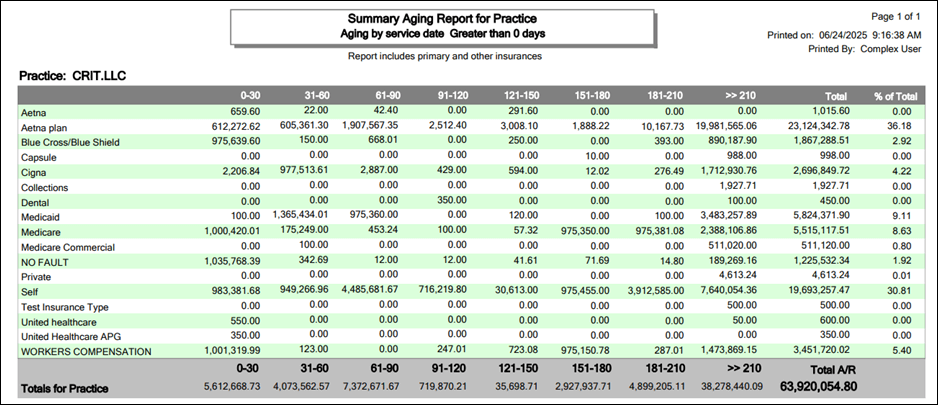
8. Sample Screenshot
9. Version History
| Version | Date | Description |
| 1.0 | 2025-07-18 | Initial documentation created |


