
1. Overview
Purpose:
This report shows the number of documents created during a selected date range.
Target Audience:
Clinical staff, admin
2. Report Location
Navigation Path in System:
Reports >> Billing Reports >> Documents >> Usage
3. Report Filters & Parameters
| Filter Name | Description |
| Date Span | Restricts results to a specific period |
| Group by Document name | Groups the results by name of the document |
| Group by Date | Groups the report by Date |
| Choose Fields | Restricts reports to selected fields |
4. Output Columns
| Column Name | Description |
| Document Name | Name of the document |
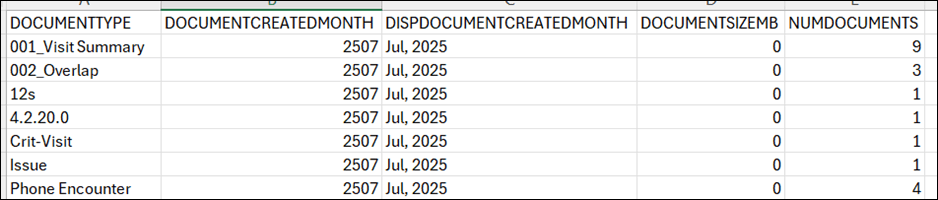
| Document Created Month | Month in which the document is created (in YYMM format) |
| Disp Document Created Month | Month in which the document is created (in Mon, YYYY format) |
| Document Size MB | Size of the document in MB |
| Num of Documents | Number of documents created during the selected date range |
5. Report Grouping / Sorting Behavior
Grouped by Name of the Document, sorted by Month
6. Export Options
Available for export in CSV format
7. Special Notes / Tips
- Use ‘Get Data’ button to refresh the data when the date span is changed.
- Use ‘Choose Fields’ option to select the columns in the export
8. Sample Screenshot
9. Version History
| Version | Date | Description |
| 1.0 | 2025-07-09 | Initial documentation created |


