
1. Overview
Purpose:
This report shows all the superbills during a selecteddate range
Target Audience:
Front desk staff, billers, clinical staff
2. Report Location
Navigation Path in System:
Reports >> Billing Reports >> Bulk Superbills
3. Report Filters & Parameters
| Filter Name | Description |
| Locations | Restricts results to one or more locations |
| Resources | Restricts results to only one resource |
| Appointment Date Span | Restricts results to appointments during a specific period |
4. Output Columns
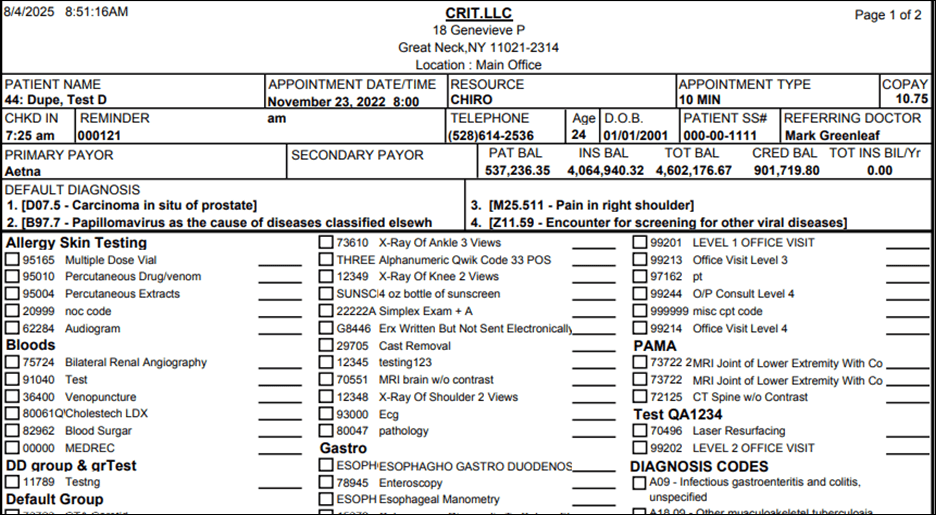
| Column Name | Description |
| PATNAME | Name of the patient |
| APPOINTMENTDATE | Date of Appointment |
| RESOURCE | Name of the resource |
| APPOINTMENT TYPE | Type of the Appointment |
| COPAY | Copay amount |
| CHKD IN | Appointment checked in time |
| REMINDER | Reminder for the appointment |
| TELEPHONE | Patient phone number |
| AGE | Patient's age |
| D.O.B | Patient's Date of birth |
| PATIENT SS# | Patient social security number |
| REFERRING DOCTOR | Name of the referring physician |
| PRIMARY PAYOR | Primary carrier information |
| SECONDARY PAYOR | Secondary carrier information |
| PAT BAL | Patient balance |
| INS BAL | Insurance balance |
| TOT BAL | Total patient and insurance balance |
| CRED BAL | Total credit balance for year |
| TOT INS BIL/Yr | Total credit balance billed to insurance for year |
| DEFAULT DIAGNOSIS | Diagnosis code from demographics page |
5. Report Grouping / Sorting Behavior
Sorted by Appointment Time ascending
6. Export Options
Available for export in PDF, Excel and CSV format
7. Special Notes / Tips
- Only one Resource can be selected
8. Sample Screenshot
9. Version History
| Version | Date | Description |
| 1.0 | 2025-08-04 | Initial documentation created |


