
1. Overview
Purpose:
This report shows the different types of appointments that are scheduled or checked-in during a specific date range.
Target Audience:
Front desk staff, clinical staff, admin
2. Report Location
Navigation Path in System:
Reports >> Billing Reports >> Scheduling Reports >> Appointment Type Analysis
3. Report Filters & Parameters
| Filter Name | Description |
| Locations | Restricts results to one or more locations |
| Select Date Span | Restricts results to appointments during a specific period |
| Show analysis by Insurance Carrier | Groups results by insurance carrier |
| Show only checked-in appointments | Restricts results to only checked-in appointments |
| Resources | Restricts results to one or more resources |
| Appointment types | Restricts results to one or more appointment types |
4. Output Columns
| Column Name | Description |
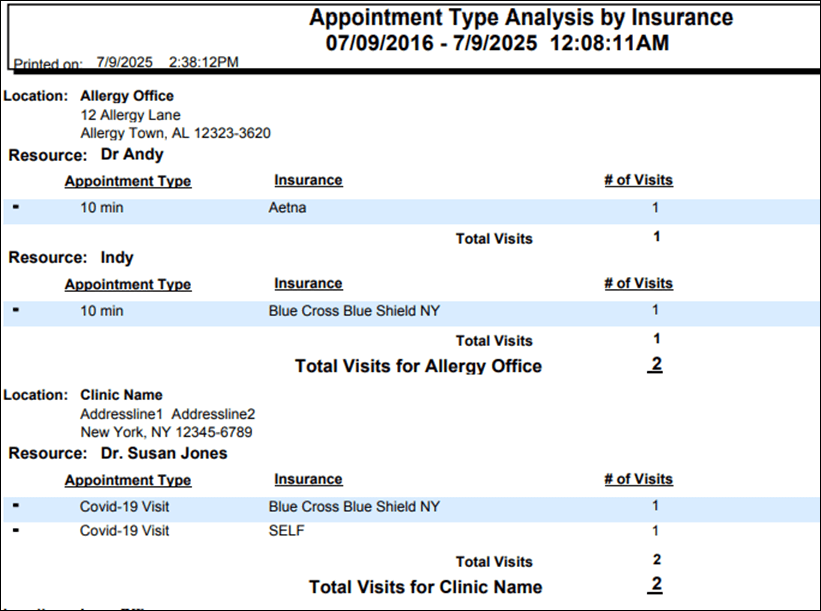
| Location | Name of the location |
| Resource | Name of the resource |
| Appointment type | Type of appointment scheduled |
| Insurance | Name of the insurance |
| #of visits | Number of visits |
5. Report Grouping / Sorting Behavior
Grouped by location and resource. Sorted by Appointment Type
6. Export Options
Available for export in PDF, Excel and CSV format
7. Special Notes / Tips
- Report includes all scheduled appointment types including checked-in appointments
- To see only checked-in appointments, select the option “show only checked-in appointments” in the filters section. Footer would display a ‘Note: Only appointments that were checked-in are shown here’ when it is selected
8. Sample Screenshot
9. Version History
| Version | Date | Description |
| 1.0 | 2025-07-08 | Initial documentation created |


