
1. Overview
Purpose:
This report shows the analysis of the units for the selected procedure group during a selected date range.
Target Audience:
Clinical staff, admin
2. Report Location
Navigation Path in System:
Reports >> Billing Reports >> Practice Reports >> Unit Analysis
3. Report Filters & Parameters
| Filter Name | Description |
| By Referring Physician | Report is grouped by Referring physician |
| Show no. of Records | Restricts the results to display the selected no. of records |
| Sort by highest units | Sorts the report by highest to lowest units performed |
| By insurance Carrier | Report is grouped by Insurance Carrier |
| By referring physician & insurance Carrier | Report is grouped by both referring physician and Insurance carrier |
| By service date span | Restricts results to a specific service date range |
| By year | Restricts results to show units per month in a specific year |
| Show patient names and CPT4 code also | Includes patient name and procedure code |
| Split by Master Physician | Results are split by Master physician |
| Procedure group | Restricts results to one or more procedure groups |
| Location | Restricts results to one or more locations |
| Referring Physician | Restricts results to one or more referring physicians |
| Master Physician | Restricts results to one or more master physicians |
4. Output Columns
| Column Name | Description |
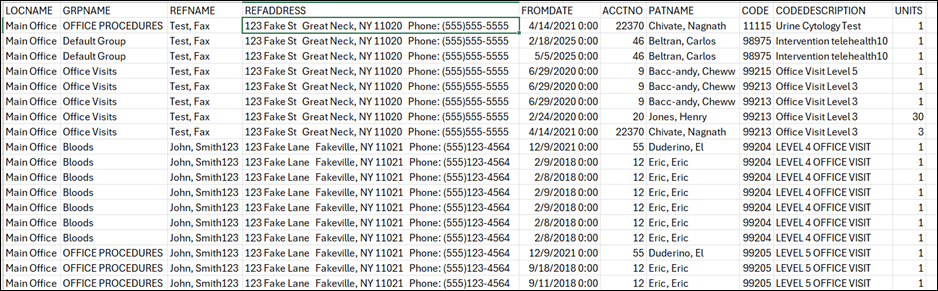
| Loc Name | Name of the location |
| GRP Name | Name of the procedure group |
| Ref Name | Name of the referring physician |
| Ref Address | Address of the referring physician |
| Phys Name | Name of the Master Physician (when 'Split by Master Physician’ is selected) |
| From Date | From Date of service (when 'Show patient names and CPT4 code also' is selected) |
| Acct No | Patient Account number (when 'Show patient names and CPT4 code also' is selected) |
| Pat Name | Name of the patient |
| Code | Procedure code |
| Code Description | Description of the procedure code |
| Units | Number of units of the procedure |
5. Report Grouping / Sorting Behavior
Grouped by Procedure Group. Additional grouping can be done by using Split and sort filters
6. Export Options
Available for export in PDF and CSV format
7. Special Notes / Tips
- Select time span By Service Date span filter gives two options ‘Show Patient names and CPT4 code also’ and ‘Split by Master Physician’
- Select time span By year gives only one option ‘Split by Master Physician’
8. Sample Screenshot
9. Version History
| Version | Date | Description |
| 1.0 | 2025-07-14 | Initial documentation created |


