
1. Overview
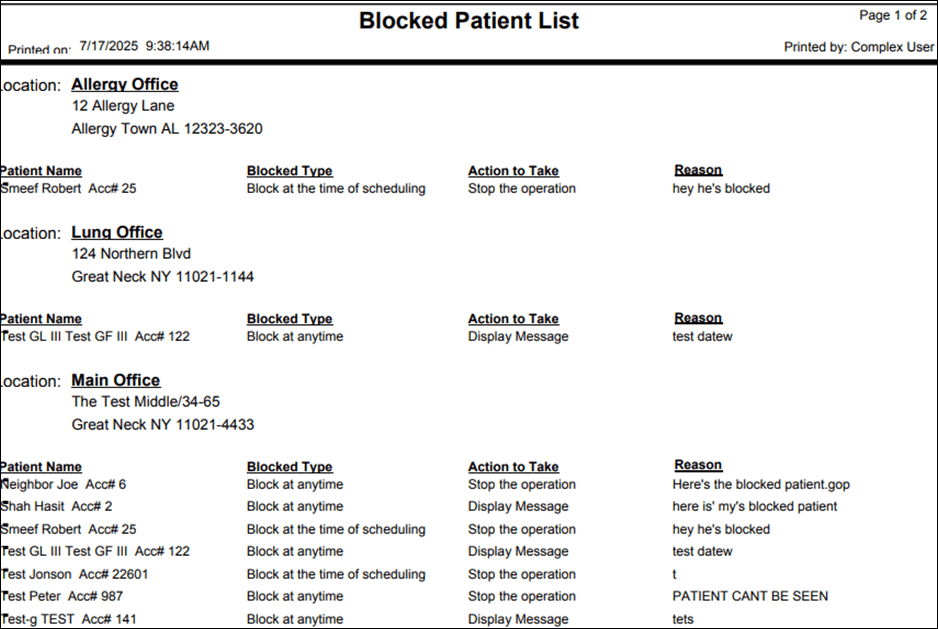
This report shows the list of patients that are blocked by the practice and the reason for blocking
2. Report Location
Navigation Path in System:
Reports >> Billing Reports >> Scheduling Reports >> Blocked Patients
3. Report Filters & Parameters
| Filter Name | Description |
| Click on Blocked Patients option | Results to include blocked patients for the selected Practice |
4. Output Columns
| Column Name | Description |
| Patient Name | Name of the Patient |
| Blocked Type | Type of blocking assigned using 'At the time of' field when blocking the patient |
| Action to Take | Action to be taken on the blocked patient |
| Reason | Reason for blocking |
5. Report Grouping / Sorting Behavior
Grouped by Location, sorted by Patient Name in Alphabetical Order
6. Export Options
Available for export in PDF
7. Special Notes / Tips
Action to Take and Reason for blocking can be defined by the Practice
8. Sample Screenshot (Optional)
9. Version History
| Version | Date | Description |
| 1.0 | 2025-07-17 | Initial documentation created |


