
1. Overview
Purpose:
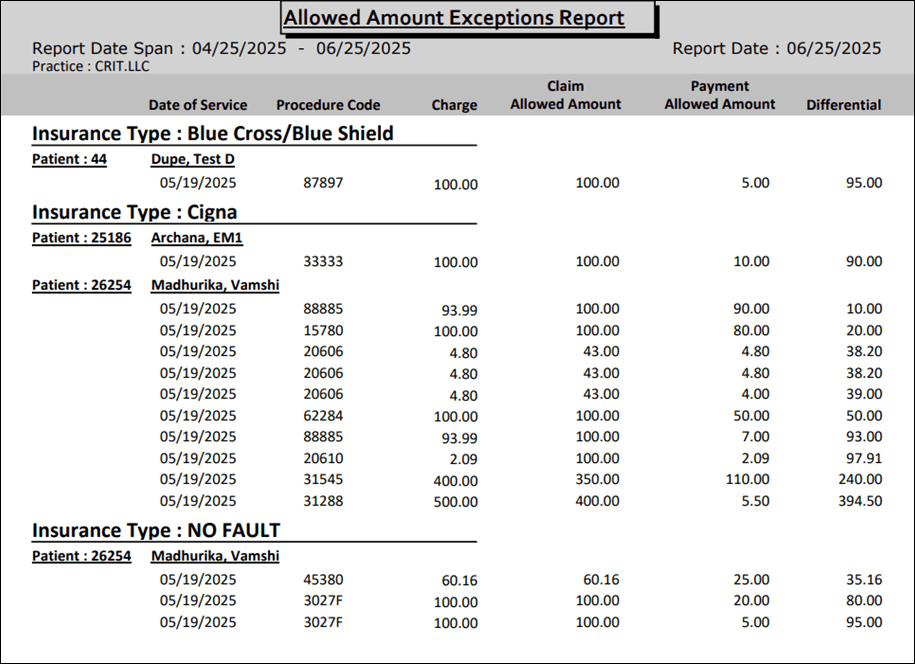
This report shows claims where the allowed amount deviates from the expected contracted rates during the selected date range.
Target Audience:
Billers, clinical staff, admin.
2. Report Location
Navigation Path in System:
Reports >> Billing Reports >> Daily Reports >> Allowed Amount Exception Report
3. Report Filters & Parameters
| Filter Name | Description |
| Select Insurance Type | Select Insurance Type(s) |
| Service date span | Limits the results to a specific period. |
4. Output Columns
| Column Name | Description |
| Insurance Type | Name of the insurance type |
| Patient Account | Patient Account number |
| Patient Name | Name of the patient |
| Date of Service | Date of Service |
| Procedure Code | Procedure Code |
| Charge | Charge amount for the procedure code |
| Claim Allowed Amount | Max. amount allowed to be collected |
| Payment Allowed Amount | Max. amount collected from the carrier |
| Differential | Difference between Claim Allowed Amount and Payment Allowed amount |
5. Report Grouping / Sorting Behavior
Grouped by Insurance Type, sorted by Patient Account Number in ascending order of the differential amount
6. Export Options
Available for export in CSV, Pdf and Excel format
7. Special Notes / Tips
Includes only charges where the payment allowed amount is different from claim allowed amount
8. Sample Screenshot
9. Version History
| Version | Date | Description |
| 1.0 | 2025-07-09 | Initial documentation created |


