
1. Overview
Purpose:
This report shows the monthly summary of the charges billed and the amount received for the selectedyear
Target Audience:
Billers, admin
2. Report Location
Navigation Path in System:
Reports >> Billing Reports >> Practice Reports >> Monthly Report
3. Report Filters & Parameters
| Filter Name | Description |
| All Locations | Includes results of all locations |
| Select Locations | Restricts results to one location |
| Year | Restricts results to specific year |
4. Output Columns
| Column Name | Description |
| Month | Calendar months from January to December |
| Charges | Total charges billed |
| Allowed | Allowed Amount |
| Non-Allowed | Non allowed amount |
| Received | Received amount |
| % received against Billed | % of the amount received against billed |
| % received against Allowed | % of the amount received against allowed |
| Writeoff | Writeoff amount |
| Applied from CB | Amount applied from credit balance |
| Balance | Balance amount |
5. Report Grouping / Sorting Behavior
Sorted by Calendar month ascending
6. Export Options
Available for export in PDF, Excel and CSV format
7. Special Notes / Tips
- Includes percentage of amount received against billed and allowed
8. Sample Screenshot
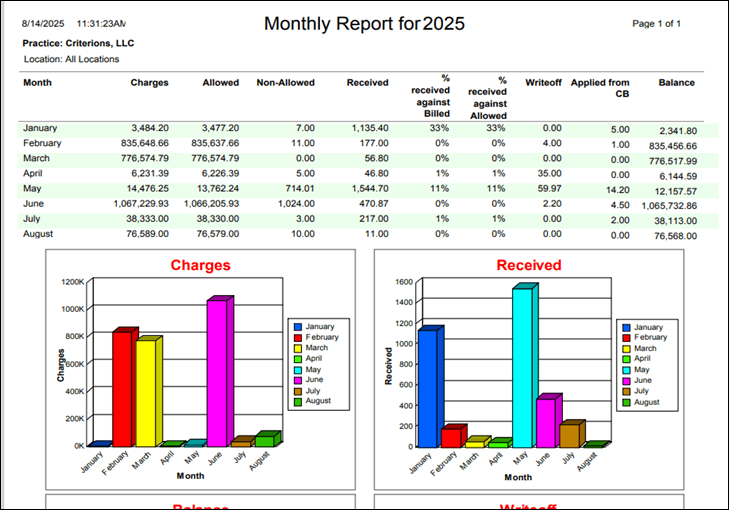
9. Version History
| Version | Date | Description |
| 1.0 | 2025-08-14 | Initial documentation created |


