
1. Overview
Purpose:
An appointment no-show report tracks patients or clients who miss scheduled appointments without prior cancellation or notification. This report is crucial for understanding the extent of missed appointments, their impact, and potential strategies to improve attendance rates
Target Audience:
Front desk staff, clinical staff, admin
2. Report Location
Navigation Path in System:
Reports >> Billing Reports >> Scheduling Reports >> No-Show Report
3. Report Filters & Parameters
| Filter Name | Description |
| Resources | Restricts results to one or more resources |
| Locations | Restricts results to one or more locations |
| Select Date Span | Restricts results to appointments during a specific period |
| Filter by Referring Doctors (From Demographics) | Restricts referring physician from demographics |
| Show first appointment date and total no shows up to 'End Date' selected | Results include the first appointment date and the number of no shows during a specific period |
4. Output Columns
| Column Name | Description |
| Location | Name of the location |
| Address1 | Location Address 1 |
| Address2 | Location Address 2 |
| Locationscz | Location State City Zip |
| Acctno | Patient account number |
| Pat name | Name of the patient |
| Pat home phone | Patient phone number (Res) from demographics page |
| Pat NF | Patient's insurance is No fault |
| Pat WC | Patient's insurance is Worker's Compensation |
| Pat blocked | Patient is blocked in EHR |
| Resource name | Name of the resource from scheduler |
| Appointment date | Appointment date |
| Appt time | Appointment time |
| Appt time for sorting | Detailed Appointment time |
| Appt confirmed | Appointment Confirmation Status |
| First appt date | Patient first appointment booked |
| Total no show | Total No. of No Shows for the patient |
| Appt type | Type of Appointment |
| Practice name | Name of the practice |
| Username | Username of the user scheduling the appointment |
| Refer phys | Name of referring physician |
| Last appt | Most recent appointment |
| Last seen | Last seen date for the same appointment type |
5. Report Grouping / Sorting Behavior
Grouped by Resource, sorted by Appointment Time descending
6. Export Options
Available for export in PDF and CSV format
7. Special Notes / Tips
- PDF format is a preview format. CSV export will show additional fields
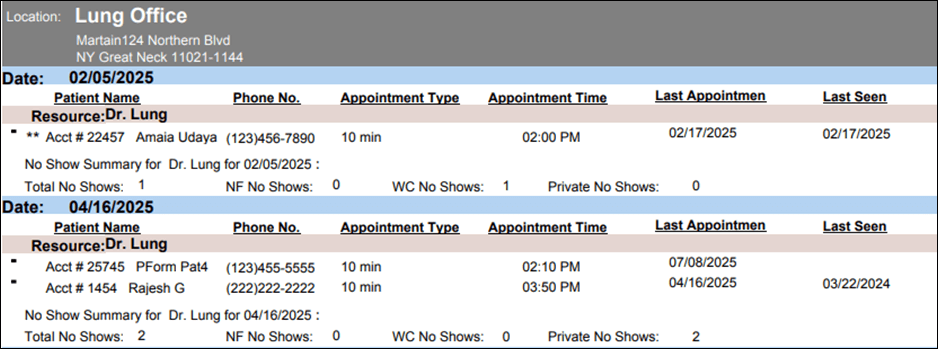
8. Sample Screenshot
9. Version History
| Version | Date | Description |
| 1.0 | 2025-07-18 | Initial documentation created |


