
1. Overview
Purpose:
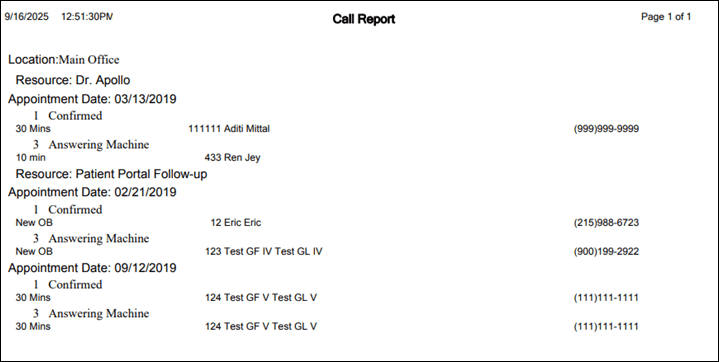
This report shows the status of calls made to the patients to get appointment confirmations during a selected date range.
Target Audience:
Front desk staff, admin
2. Report Location
Navigation Path in System:
Reports >> Billing Reports >> Scheduling Reports >> Appointment Call Report
3. Report Filters & Parameters
| Filter Name | Description |
| Scheduler Date Range | Restricts results to selected date range |
| Limit By Location | Restricts results to one or more location |
| Limit By Resource | Restricts results to one or more resources |
4. Output Columns
| Column Name | Description |
| Appointment date | Appointment date |
| Appointment call status | Status of the appointment call e.g., Confirmed/answering machine etc. |
| Appointment type | Type of appointment |
| Account number | Patient account number |
| Name | Name of the patient |
| Phone | Patient's phone number |
5. Report Grouping / Sorting Behavior
Grouped by Resource and Appointment Time ascending
6. Export Options
Available for export in PDF and CSV format
7. Special Notes / Tips
Check boxes for Limit by location and Limit by Resource should be selected to open the location or resource list
8. Sample Screenshot
9. Version History
| Version | Date | Description |
| 1.0 | 2025-09-12 | Initial documentation created |


