
1. Overview
Purpose:
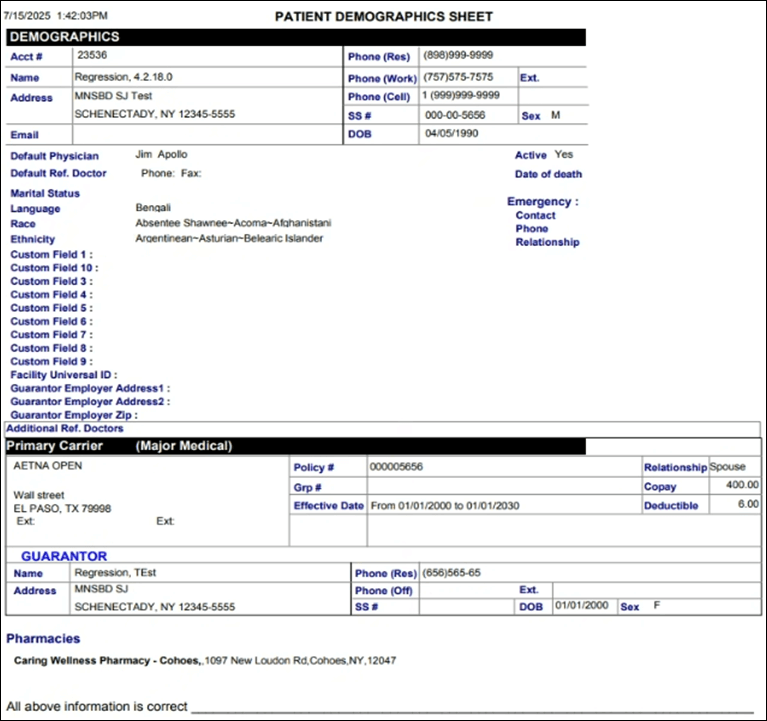
This pdf report shows the patient demographic details during a selecteddate range
Target Audience:
Front desk staff, clinical staff, admin
2. Report Location
Navigation Path in System:
Reports >> Billing Reports >> Bulk Patient Demographics
3. Report Filters & Parameters
| Filter Name | Description |
| Resources | Restricts results to one or more resources |
| Appointment Date Span | Restricts results to appointments during a specific period |
4. Output Columns
| Column Name | Description |
| Acct # | Patient account number |
| Name | Name of the patient |
| Address | Address of the Patient |
| Phone (Res) | Patient residence phone number |
| Phone (Work) | Patient work phone number |
| Phone (Cell) | Patient cell Phone number |
| SS# | Patient Social Security Number |
| DOB | Patient Date of birth |
| Default Physician | Default Physician in Demographics |
| Default Ref. Doctor | Default Referring Physician in Demographics |
| Marital Status | Patient marital status |
| Language | Patient preferred language |
| Race | Patient Race as given in the demographics |
| Ethnicity | Patient's Ethnicity as given in the demographics |
| Active | Whether Patient is marked as active / inactive in Criterions EHR |
| Date of death | Patient 's Date of Death |
| Emergency | Emergency contact information |
| Contact | Name of the emergency contact |
| Phone | Phone number of the emergency contact |
| Relationship | Emergency contact's relation with patient |
| Additional Ref. Doctors | Any additional referring physicians added in demographics |
| Primary Carrier | Primary Insurance information |
| Policy # | Insurance Policy number |
| Grp # | Insurance group number |
| Effective Date | Insurance Policy Effective Date |
| Relationship | Relationship of the patient to the policy holder |
| Copay | Copay Amount |
| Deductible | Deductible Amount |
| Pharmacies | Patient's Pharmacy |
| Custom Fields | Custom field options as defined by the Practice |
5. Report Grouping / Sorting Behavior
Data grouped by patient
6. Export Options
Available for export in PDF
7. Special Notes / Tips
- Report includes all custom fields that are set as mandatory in patient demographics
8. Sample Screenshot
9. Version History
| Version | Date | Description |
| 1.0 | 2025-07-17 | Initial documentation created |


