
1. Overview
Purpose:
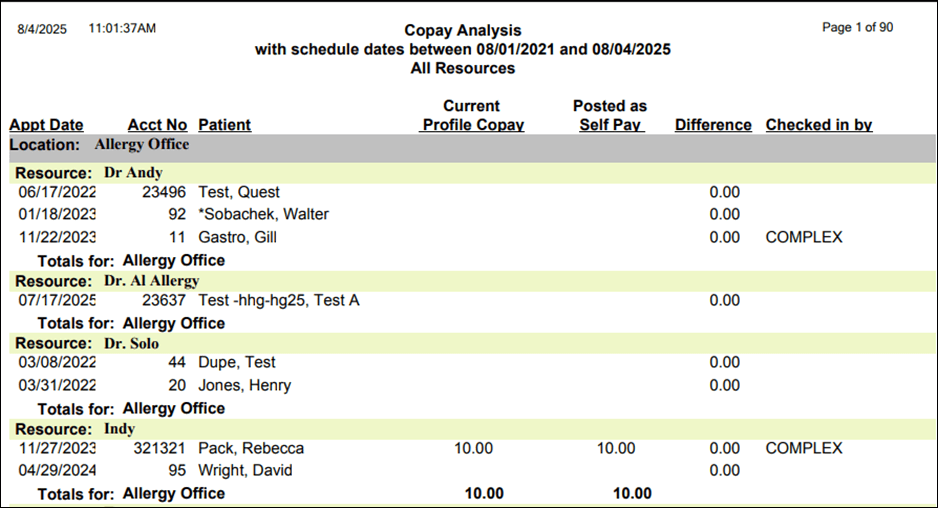
This report shows analysis of Copay made by the patient during a selecteddate range
Target Audience:
Front desk staff, billers, clinical staff, admin
2. Report Location
Navigation Path in System:
Reports >> Billing Reports >> Scheduling Reports >> Copay Analysis Report
3. Report Filters & Parameters
| Filter Name | Description |
| Schedule Date Span | Restricts results of schedules to a specific period |
| Limit By Resources | Restricts results to one or more resources |
| Limit By Account No | Restricts results to one patient account |
| Display Only Exceptions | Restricts results to services with unpaid copay balance |
| Display Only Patients Checked In | Restricts results to scheduled and checked in patients |
| Select Location | Restricts results to one or more locations |
4. Output Columns
| Column Name | Description |
| Appt Date | Appointment date |
| Acct No | Patient account number |
| Patient | Name of the patient |
| Current Profile Copay | Copay for the current appointment |
| Posted by self-pay | Copay paid by the patient |
| Difference | Copay Difference amount (Current profile Copay minus Posted by Self Pay) |
| Checked in by | User who has checked in the patient |
5. Report Grouping / Sorting Behavior
Grouped by Resource, sorted by Appointment Date
6. Export Options
Available for export in PDF and CSV format
7. Special Notes / Tips
- Clicking on Export button downloads the file in CSV format.
- Clicking on Preview button opens the file in PDF format which can be downloaded
8. Sample Screenshot
9. Version History
| Version | Date | Description |
| 1.0 | 2025-08-04 | Initial documentation created |


