
1. Overview
Purpose:
This report shows the sign-in details of the patients during a selecteddate range
Target Audience:
Front desk staff, admin
2. Report Location
Navigation Path in System:
Reports >> Billing Reports >> Scheduling Reports >> Sign-in Sheet
3. Report Filters & Parameters
| Filter Name | Description |
| Select Resource to print patient sign in sheet | Restricts the results to one or more resources |
| Select date span to print patient sign in sheet | Restricts the results to selected date range |
| Select Location | Restricts the results to one location |
| Print Sign In Sheet By Account number | Sorts the results by the patient's account number |
| Print Sign In Sheet By Appointment time | Sorts the results by the patient's appointment time |
| Print Sign In Sheet By Patient name | Sorts the results by the patient's name |
| Ascending Order | Sorts the results in ascending order of selection |
| Descending Order | Sorts the results in descending order of selection |
4. Output Columns
| Column Name | Description |
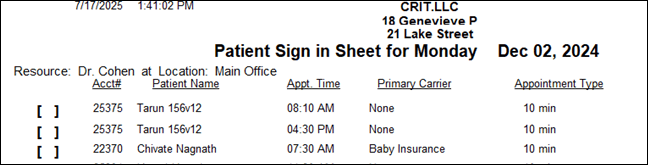
| Acct# | Account number of the patient |
| Patient Name | Name of the patient |
| Appt. Time | Appointment time |
| Primary Carrier | Name of the primary carrier |
| Appointment Type | Type of the appointment |
5. Report Grouping / Sorting Behavior
Grouped by Resource, sorted by the filter selected for sorting
6. Export Options
Available for export in PDF, Excel and CSV format
7. Special Notes / Tips
- It shows only primary carrier information.
- Does not show copay or other sign in information
8. Sample Screenshot
9. Version History
| Version | Date | Description |
| 1.0 | 2025-07-28 | Initial documentation created |


